
How to Edit or Delete a Cron Job in cPanel
Cron jobs help us automate important tasks on our hosting account, such as running scripts, processing scheduled actions, sending emails, or performing routine maintenance. As our website grows, we may need to update an existing cron job or remove one that’s no longer needed.
In this guide, we’ll show you how to edit or delete a cron job directly from cPanel.
How to Edit a Cron Job in cPanel
If we need to change how often a cron job runs or update the command it executes, cPanel makes it easy to modify an existing cron job.
Step 1: Log in to cPanel
Access your hosting account and log in to your cPanel dashboard.
Step 2: Open the Cron Jobs Tool
In the Advanced section, click on Cron Jobs.

This will display all scheduled tasks currently configured on your hosting account.
Step 3: Locate the Cron Job
Scroll down to the Current Cron Jobs section.
Find the cron job you want to modify and click Edit.
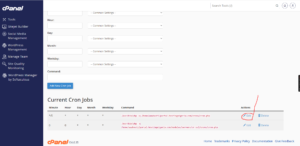
Step 4: Update the Cron Job Settings
Make the necessary changes to:
- The execution schedule
- The command path
- The script being executed
- Custom timing intervals
Once you’ve finished updating the settings, click Edit Line to save the changes.
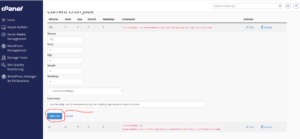
Cron Job Successfully Updated
Your cron job will immediately begin running according to the new schedule and settings.
How to Delete a Cron Job in cPanel
If a scheduled task is no longer required, we can remove it completely from our hosting account.
Step 1: Locate the Cron Job
Under the Current Cron Jobs section, find the cron job you wish to remove.
Click Delete next to the cron job.
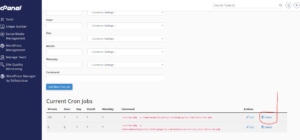
Step 2: Confirm the Deletion
A confirmation prompt will appear asking if you’re sure you want to delete the cron job.
Click Delete again to confirm.
Cron Job Successfully Removed
The cron job will be permanently removed and will no longer execute on your hosting account.
When Should We Edit or Delete a Cron Job?
You may want to update or remove a cron job if:
- A script has been moved to a different location.
- The task needs to run more or less frequently.
- The website no longer requires the automated task.
- You’re troubleshooting server resource usage.
- The cron job is generating errors.
Best Practices for Managing Cron Jobs
To keep your hosting account running efficiently, we recommend:
- Reviewing active cron jobs regularly.
- Removing unused scheduled tasks.
- Testing scripts before scheduling them.
- Avoiding duplicate cron jobs performing the same task.
- Monitoring cron job output for errors.
Tip: Before deleting a cron job, make sure it’s no longer required by your website, application, or plugin. Removing an important cron job may cause certain automated functions to stop working.