
How to Bulk Delete Posts in WordPress
As our website grows, we may accumulate old, duplicate, or unnecessary posts that we no longer need. Instead of deleting them one by one, WordPress allows us to remove multiple posts at once using the bulk actions feature.
In this guide, we’ll show you how to bulk delete posts in WordPress and permanently remove them if necessary.
Why Bulk Delete Posts?
Bulk deleting posts helps us:
- Clean up outdated content.
- Remove duplicate or test posts.
- Organize our website more efficiently.
- Save time compared to deleting posts individually.
- Improve overall content management.
Step 1: Log in to the WordPress Dashboard
Access the WordPress Admin Dashboard using your username and password.
Once logged in, we’ll have access to all our posts and website content.
Step 2: Open All Posts
From the left-hand menu, navigate to:
Posts → All Posts
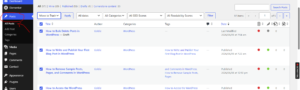
This page displays all the posts currently published, drafted, or scheduled on our website.
Step 3: Select the Posts to Delete
To delete all posts displayed on the page, click the checkbox at the top of the list.
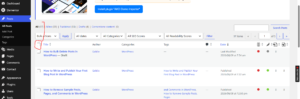
Alternatively, we can select specific posts by checking the boxes next to them.
This allows us to delete only the posts we no longer need.
Step 4: Use the Bulk Actions Menu
Above the posts list, click the Bulk Actions dropdown menu.
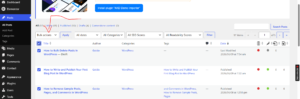
Select:
Move to Trash
Then click Apply.
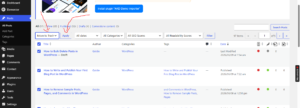
All selected posts will be moved to the Trash.
Step 5: Permanently Delete Posts (Optional)
Moving posts to the Trash does not delete them permanently.
To remove them completely:
- Click Trash at the top of the Posts page.
- Click Empty Trash.
This will permanently delete all posts in the Trash folder.
Warning: Permanently deleted posts cannot be recovered unless we have a backup of our website.
How to Delete Specific Posts in Bulk
If we only want to remove selected posts:
- Go to Posts → All Posts.
- Check the boxes beside the posts we want to delete.
- Choose Move to Trash from the Bulk Actions menu.
- Click Apply.
This allows us to clean up our website without affecting other content.
Best Practices Before Bulk Deleting Posts
Before removing multiple posts, we recommend:
- Creating a backup of the website.
- Reviewing posts carefully before deletion.
- Deleting duplicate or outdated content only.
- Checking internal links that may point to the deleted posts.
- Redirecting important URLs if necessary to avoid broken links.
When Should We Bulk Delete Posts?
Bulk deletion is useful when:
- Cleaning up test content after launching a website.
- Removing old articles that are no longer relevant.
- Deleting duplicate posts.
- Reorganizing a blog or content strategy.
- Preparing a fresh WordPress installation.
Tip: Instead of permanently deleting valuable content, consider converting posts into drafts first. This allows us to preserve the content while removing it from public view.