
How to Remove a CSR Code in cPanel
If you’ve generated a Certificate Signing Request (CSR) that is no longer needed, you can remove it from your cPanel account. Cleaning up unused CSR records helps keep your SSL/TLS management area organized and easier to navigate.
In this guide, you’ll learn how to delete a CSR code from cPanel safely.
What Is a CSR?
A Certificate Signing Request (CSR) is a block of encoded text generated when requesting an SSL certificate. It contains information about your domain and organization and is submitted to a Certificate Authority (CA) during the SSL issuance process.
Once a certificate has been issued, you may no longer need certain CSR records stored on your server.
Important: Before deleting a CSR, make sure you have a backup of any CSR associated with an active SSL certificate. You may need it later when reissuing or replacing your SSL certificate.
Step 1: Log in to Your cPanel Account
Access your cPanel account using your username and password.
Step 2: Open the SSL/TLS Manager
Navigate to the Security section and click SSL/TLS.
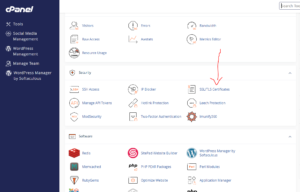
This area allows you to manage SSL certificates, private keys, and certificate signing requests.
Step 3: Access Stored CSR Records
Under the Certificate Signing Requests (CSR) section, click:
Generate, View, or Delete Certificate Signing Requests
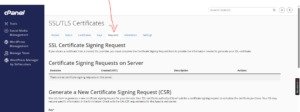
You’ll be taken to a page displaying all CSR codes currently stored on your account.
Step 4: Locate the CSR You Want to Remove
Under Certificate Signing Requests on Server, find the CSR record you wish to delete.
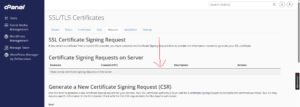
Review the associated domain carefully to ensure you’re removing the correct CSR.
Step 5: Delete the CSR
Click Delete under the Actions column next to the CSR.
A confirmation prompt will appear.
Click Delete again to confirm the removal.
Congratulations! The CSR has been successfully removed from your server.
What Happens After Deleting a CSR?
Deleting a CSR:
- Removes the stored certificate signing request from cPanel.
- Does not affect installed SSL certificates.
- Does not remove private keys.
- Does not impact website functionality.
However, the CSR can no longer be retrieved from the server once deleted.
Common Questions
Will Deleting a CSR Break My SSL Certificate?
No. An installed SSL certificate will continue working normally after the CSR is deleted.
Can I Recover a Deleted CSR?
No. Once removed, the CSR cannot be restored unless you have a backup copy saved elsewhere.
Should I Delete Old CSR Records?
Yes. Removing unused CSR records can help keep your SSL/TLS management area organized and reduce confusion when managing multiple certificates.
Best Practices for CSR Management
To avoid future issues:
- Save a copy of every CSR you generate.
- Keep backups of active SSL-related files.
- Label certificates and domains clearly.
- Remove outdated CSR records periodically.
- Store SSL documents securely.
Conclusion
Deleting an unused CSR in cPanel is a simple process that helps keep your SSL management area clean and organized. Just make sure you’ve backed up any CSR that may be needed in the future before removing it permanently.
Tip: If you’re planning to renew or reissue an SSL certificate, consider keeping a backup copy of the original CSR for future reference.