
How to Access Softaculous in cPanel
Softaculous is a powerful one-click application installer that allows you to install and manage websites, blogs, forums, eCommerce stores, and other web applications directly from your hosting account. It eliminates the need for manual installations, making it easier to launch and manage your website.
In this guide, you’ll learn how to access Softaculous from your cPanel account.
What Is Softaculous?
Softaculous is an auto-installer that helps you deploy popular applications such as:
- WordPress
- Joomla
- Drupal
- OpenCart
- MyBB
- phpBB
- Magento
- PrestaShop
and hundreds of other scripts with just a few clicks.
It also allows you to manage updates, create backups, restore websites, clone installations, and uninstall applications.
Step 1: Log in to Your cPanel Account
Access your cPanel account using your username and password.
Once logged in, you’ll be taken to the main cPanel dashboard.
Step 2: Open Softaculous Apps Installer
Scroll to the Software section of your cPanel dashboard.
Click on Softaculous Apps Installer.
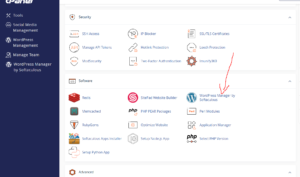
Depending on your hosting provider, the Softaculous icon may also be labeled as:
- Softaculous
- Softaculous Apps Installer
- WordPress Manager by Softaculous
Step 3: Access the Softaculous Dashboard
After clicking the Softaculous icon, the Softaculous interface will open.
From here, you can:
- Browse available applications.
- Install new scripts.
- Manage existing installations.
- Create backups.
- Restore websites.
- Update applications.
- Clone or stage websites.
Congratulations! You now have access to the Softaculous control panel.
Returning to cPanel
If you need to return to the main cPanel dashboard, simply click the cPanel icon located within the Softaculous interface.
This will take you back to your hosting control panel without logging out.
Common Issues When Accessing Softaculous
Softaculous Is Missing from cPanel
If you don’t see Softaculous in the Software section:
- Your hosting provider may not have Softaculous installed.
- Your hosting package may not include Softaculous access.
- The feature may be disabled by your hosting administrator.
Softaculous Won’t Open
If clicking the icon doesn’t load Softaculous:
- Refresh your browser.
- Clear your browser cache.
- Try a different browser.
- Contact your hosting provider if the issue persists.
Why Use Softaculous?
Softaculous simplifies website management by allowing you to:
- Install applications in minutes.
- Keep software updated.
- Create automated backups.
- Restore websites quickly.
- Manage multiple installations from one dashboard.
This makes it one of the most useful tools available in cPanel for website owners.
Conclusion
Softaculous provides an easy way to install and manage web applications directly from cPanel. Whether you’re launching a WordPress blog, an online store, or a community forum, Softaculous helps you get started quickly without manual setup.
Tip: Before installing any application, review the available backup options in Softaculous to ensure your website data remains protected.