
How to Create a MySQL Database in cPanel
A MySQL database is used to store website data, including content, user information, settings, and application data. Many popular platforms such as WordPress, Joomla, Drupal, and Magento require a database to function properly.
Follow the steps below to create a new MySQL database in cPanel.
Step 1: Log in to cPanel
Access your hosting account and log in to your cPanel dashboard.
Step 2: Open MySQL Databases
In the Databases section, click on MySQL Databases.
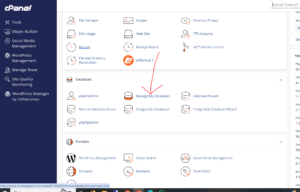
Step 3: Create a New Database
Locate the Create New Database section.
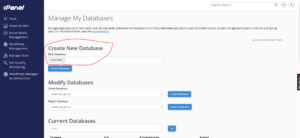
In the New Database field, enter a name for the database you want to create.
For example:
- wordpress_db
- website_data
- store_database
Keep the database name descriptive so it is easier to identify later.
Step 4: Create the Database
Click Create Database to complete the process.
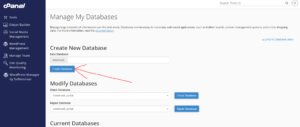
Database Successfully Created
Once the database has been created, cPanel will display a confirmation message.
Your new database is now ready to be used by your website or application.
What to Do Next
After creating the database, you will typically need to:
- Create a MySQL user.
- Assign the user to the database.
- Grant the necessary database privileges.
- Configure your application with the database credentials.
These additional steps are required before most content management systems and web applications can connect to the database.
Why Databases Are Important
Databases are essential for storing and managing:
- Website content
- User accounts and login information
- Product catalogs
- Customer data
- Application settings
- Dynamic website information
Tip: Use meaningful database names and keep a record of your database credentials for easier website management and troubleshooting.