How to Create an Email Account in cPanel
Creating a professional email address using your domain name helps establish credibility and trust for your business. With cPanel, you can quickly set up custom email accounts such as info@yourdomain.com, support@yourdomain.com, or john@yourdomain.com.
Follow the steps below to create a new email account in cPanel.
Step 1: Log in to cPanel
Access your hosting account and log in to your cPanel dashboard.
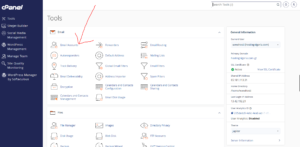
Step 2: Open the Email Accounts Tool
In the Email section, click on Email Accounts.
Step 3: Create a New Email Account
Click the + Create button located on the right-hand side of the page.

Step 4: Enter the Email Account Details
Under the Create An Email Account section, fill in the required information:

Domain
If your hosting account contains multiple domains, select the domain you want to use for the email address from the drop-down menu.
Username
Enter the username for your email account.
Examples:
- info
- support
- sales
- john
The complete email address will be created automatically, such as info@yourdomain.com.
Security
Choose Set Password Now and create a strong password for your email account.
Alternatively, click the password generator to create a secure password automatically.
Optional Settings
Click Edit Settings to access additional options.
Under Storage Space, choose one of the following:
- Enter a specific storage limit.
- Select Unlimited if you do not want to restrict mailbox storage.
Step 5: Create the Email Account
After reviewing your settings, click Create.

Email Account Successfully Created
Once the setup is complete, cPanel will display a confirmation message indicating that your email account has been created successfully.
Benefits of Using a Custom Domain Email Address
Creating a professional email address offers several advantages:
- Builds trust and credibility with customers.
- Strengthens your brand identity.
- Provides a more professional appearance than free email services.
- Keeps business communications organized.
- Enhances customer confidence in your business.
Tip: Use strong, unique passwords for all email accounts and enable additional security features when available to help protect against unauthorized access.