
How to Download a Backup of Your Home Directory, MySQL Database, or Email Accounts in cPanel
Regular backups are essential for protecting your website, databases, and email accounts from accidental loss, corruption, or security issues. cPanel’s Backup Wizard makes it easy to create and download partial backups of specific parts of your hosting account.
This guide will show you how to download backups of your Home Directory, MySQL databases, or email data using cPanel.
Step 1: Log in to cPanel
Access your hosting account and log in to your cPanel dashboard.
Step 2: Open the Backup Wizard
In the Files section, click on Backup Wizard.
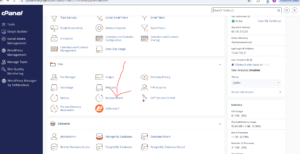
Step 3: Start the Backup Process
Under the Backup or Restore section, click Back Up.

Step 4: Choose a Partial Backup Option
Under the Select Partial Backup section, you will see several backup options available, including:
- Home Directory – Backs up your website files, images, themes, plugins, and other account files.
- MySQL Databases – Backs up your website databases.
- Email Forwarders & Filters – Backs up your email forwarding and filtering configurations.
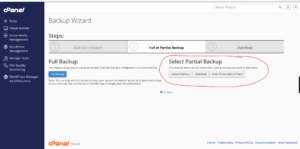
Select the type of backup you want to create.
For example, to download a backup of your website files, click Home Directory.
Step 5: Download the Backup
Once the backup file has been generated, click Download to save it to your computer.

Depending on the size of the backup, the download may take a few minutes to complete.
Why Regular Backups Are Important
Creating regular backups helps you:
- Protect your website from data loss.
- Recover files after accidental deletion.
- Restore your site after security incidents.
- Safeguard email settings and configurations.
- Maintain copies of important databases.
Types of Partial Backups in cPanel
Home Directory Backup
Includes website files, media uploads, scripts, and application files stored within your hosting account.
MySQL Database Backup
Includes database content used by applications such as WordPress, Joomla, Magento, and other CMS platforms.
Email Forwarders and Filters Backup
Includes email forwarding rules and custom email filtering configurations.
Tip: Store backup files in multiple locations, such as your computer and a cloud storage service, to ensure maximum protection against data loss.