How to Edit or Remove an A Record in cPanel
An A Record (Address Record) connects a domain or subdomain to an IP address. If we’re moving our website to a new server, updating an existing IP address, or cleaning up old DNS settings, cPanel’s Zone Editor allows us to easily edit or remove A records.
In this guide, we’ll show you how to manage A records in cPanel.
Why Edit or Delete an A Record?
We may need to update or remove an A record when:
- Migrating our website to a different server.
- Changing the server’s IP address.
- Creating or removing subdomains.
- Fixing DNS configuration issues.
- Cleaning up unused records.
Keeping our DNS records up-to-date helps ensure visitors can access our website without interruption.
Step 1: Log in to cPanel
Access your hosting account and log in to your cPanel dashboard.
Step 2: Open the Zone Editor
In the Domains section, click on Zone Editor.

The Zone Editor allows us to manage all DNS records associated with our domains.
Step 3: Manage Your Domain
Locate the domain containing the A record you want to modify.
Under the Actions column, click Manage.
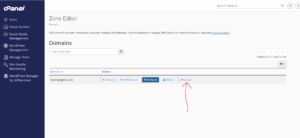
This will display all DNS records for the selected domain.
Step 4: Locate the A Record
Scroll through the list or use the search feature to find the A record you want to edit or remove.
To Edit an A Record
- Click Edit next to the A record.
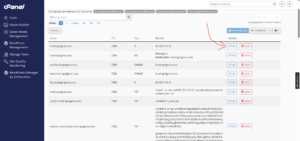
- Update the hostname or IP address as required.
- Click Save Record to apply the changes.

Your updated A record will take effect once DNS propagation is complete.
To Remove an A Record
- Locate the A record you wish to delete.
- Click Delete.

- Confirm the deletion when prompted.
The record will be removed immediately from your DNS zone.
DNS Propagation Time
Although changes are saved instantly, DNS updates may take some time to spread across the internet.
Typically, propagation takes between 12 and 24 hours, although some networks may update sooner.
Common Uses for A Records
We commonly use A records to:
- Point a domain to a web hosting server.
- Create subdomains.
- Connect websites to VPS or dedicated servers.
- Change hosting providers.
- Configure custom web services.
Best Practices for Managing A Records
To avoid downtime and DNS issues, we recommend:
- Verifying the IP address before making changes.
- Keeping a backup of your current DNS settings.
- Removing obsolete records after migrations.
- Allowing enough time for DNS propagation before troubleshooting.
Tip: Before deleting an A record, make sure it’s no longer being used. Removing an active A record can make your website or subdomain inaccessible until the correct record is restored.