
How to Optimize a Database Using phpMyAdmin in cPanel
Over time, database tables can become fragmented due to frequent updates, deletions, and changes. Optimizing your database helps improve performance, reduce storage overhead, and maintain efficient website operation.
phpMyAdmin provides a built-in optimization feature that allows you to optimize database tables directly from cPanel.
Follow the steps below to optimize a database using phpMyAdmin.
Step 1: Log in to cPanel
Access your hosting account and sign in to your cPanel dashboard.
Step 2: Open phpMyAdmin
In the Databases section, click on phpMyAdmin.
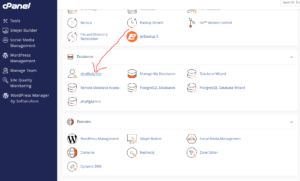
This will open the database management interface.
Step 3: Expand and Select Your Database
From the left sidebar, click the Expand icon next to your database name.
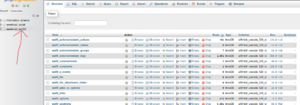
Select the database you want to optimize.
Once opened, you will see a list of all database tables.
Step 4: Select Database Tables
Scroll to the bottom of the table list.
Click Check All to select all tables.
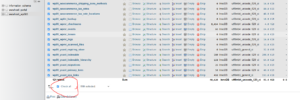
If you only want to optimize specific tables, manually select those tables instead.
Step 5: Optimize the Tables
After selecting the tables:
- Click the drop-down menu at the bottom of the page.
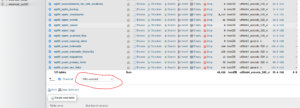
- Select Optimize Table (or Optimize tables, depending on your phpMyAdmin version).
phpMyAdmin will begin optimizing the selected tables.
Optimization Completed
Once finished, phpMyAdmin will display a success message confirming that the selected tables have been optimized.
Benefits of Database Optimization
Optimizing your database can help:
- Improve website performance
- Reduce database fragmentation
- Free unused storage space
- Speed up database queries
- Improve overall application responsiveness
When Should You Optimize Your Database?
Database optimization is useful when:
- Your website feels slower than usual
- Large amounts of data have been deleted
- Plugins or applications generate frequent database changes
- You perform routine website maintenance
Tip: Before performing database maintenance, create a backup so you can restore your data if needed.