How to Update cPanel Contact Information and Receive Resource Limit Notifications
Keeping your contact information up to date in cPanel ensures that you receive important account notifications, password reset emails, and alerts when your hosting account approaches resource limits such as disk space or bandwidth usage.
Follow the steps below to update your contact details in cPanel.
Step 1: Log in to cPanel
Access your hosting account and log in to your cPanel dashboard.
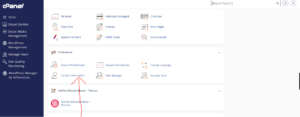
Step 2: Open Contact Information Settings
In the Preferences section, click on Contact Information.
Step 3: Update Your Email Addresses
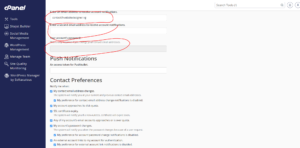
On the Contact Information page, enter or update the email address where you would like to receive account notifications.
Primary Email Address
Add a valid email address that is not hosted on the same cPanel account whenever possible. This ensures you can still receive notifications if your hosting account experiences issues.
You will receive important alerts such as:
- Password reset confirmations
- Account security notifications
- Resource usage warnings
- System maintenance notices
Secondary Email Address (Optional)
You may also add a secondary email address as a backup contact method.
Step 4: Enable Resource Limit Notifications
Ensure the notification options are enabled so cPanel can alert you when your account reaches certain thresholds, including:
- Disk space usage limits
- Bandwidth usage limits
- Quota warnings
- Account-related notifications
These alerts help you take action before your website is affected by resource restrictions.
Step 5: Save Your Changes
Enter your current cPanel password to verify the changes.
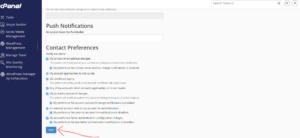
Click Save to update your contact information.
Contact Information Successfully Updated
Once saved, cPanel will confirm that your contact details have been updated successfully.
Why Keeping Contact Information Updated Matters
Accurate contact information helps you:
- Receive password reset emails promptly.
- Monitor disk and bandwidth usage.
- Stay informed about account security events.
- Avoid service interruptions due to resource limits.
- Receive important hosting-related announcements.
Tip: Use an external email address, such as Gmail or Outlook, for cPanel notifications. This ensures you can still receive important alerts even if your website or email service is temporarily unavailable.