
How to Add a User to a Database and Grant Privileges in cPanel
After creating a database and a database user in cPanel, the next step is to connect the user to the database and assign permissions. Without privileges, the database user will not be able to access, modify, or manage the database.
Follow the steps below to add a user to a database and grant privileges in cPanel.
Step 1: Log in to cPanel
Access your hosting account and log in to your cPanel dashboard.
Step 2: Open MySQL Databases
In the Databases section, click on MySQL Databases (or Manage My Databases, depending on your cPanel interface).
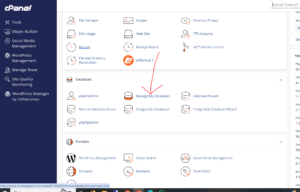
Step 3: Add User to Database
Scroll down to the Add User to Database section.

Complete the following selections:
- User: Select the database user from the drop-down list.
- Database: Select the database you want the user to access.
After selecting both options, click Add.

Step 4: Assign Database Privileges
You will be redirected to the Manage User Privileges page.
Select ALL PRIVILEGES to grant the user full access to the database.
This permission allows the user to:
- Create and modify tables
- Insert, update, and delete records
- Create indexes
- Manage database structures
- Execute administrative database actions
After selecting the required permissions, click Make Changes.
User Successfully Added to Database
Once completed, cPanel will display a confirmation message showing that the user has been successfully added and assigned privileges.
Understanding Database Privileges
Depending on your project, you can assign:
- Full Access (ALL PRIVILEGES): Complete control over the database.
- Custom Permissions: Grant only specific permissions for improved security.
For production websites, only assign the privileges your application actually needs.
Why Database Privileges Matter
Database privileges help you:
- Control database access securely
- Prevent unauthorized modifications
- Separate access between applications
- Improve website security and management
Tip: For most CMS platforms like WordPress, assigning ALL PRIVILEGES during installation is the fastest and most compatible setup option.