
How to Repair a Database Using phpMyAdmin in cPanel
Database tables can occasionally become corrupted due to interrupted processes, server issues, plugin conflicts, or unexpected shutdowns. phpMyAdmin includes a repair feature that helps restore damaged MySQL tables and improve database stability.
Follow the steps below to repair database tables using phpMyAdmin in cPanel.
Step 1: Log in to cPanel
Access your hosting account and sign in to your cPanel dashboard.
Step 2: Open phpMyAdmin
In the Databases section, click on phpMyAdmin.
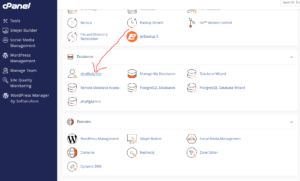
This will launch the database management interface.
Step 3: Open Your Database
From the left sidebar navigation tree, click the Expand icon next to your database name.
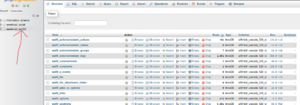
Select the database you want to repair.
You should now see a list of all tables inside that database.
Step 4: Select the Tables to Repair
Scroll to the bottom of the tables list.
Click Check All to select every table.
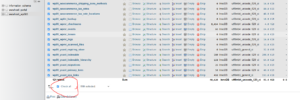
Alternatively, select only the affected tables if you know which ones require repair.
Step 5: Run Database Repair
After selecting the tables:
- Locate the With selected: dropdown menu.
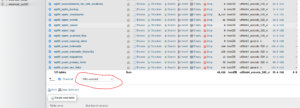
- Click the dropdown arrow.
- Select Repair table.
phpMyAdmin will begin checking and repairing the selected tables.
Step 6: Review the Results
Once completed:
- Tables repaired successfully will display an OK message.
- If issues remain, phpMyAdmin may display an error for specific tables.
Review any error messages carefully to identify tables that may require additional troubleshooting.
When Should You Repair a Database?
Database repair may help if:
- Your website shows database connection errors.
- Pages fail to load properly.
- WordPress displays database corruption messages.
- Plugins or applications behave unexpectedly.
- Tables become damaged after migrations or interruptions.
Important Notes
- Always create a backup before running database repairs.
- Repairing affects database structure and integrity.
- Large databases may take several minutes to process.
Tip: If Repair table does not resolve the issue, consider restoring from backup or checking server logs for deeper database errors.