
How to Create a Database User in cPanel
Creating a database user in cPanel allows applications and websites to securely connect to your MySQL database. Database users are assigned usernames and passwords that control access to your database.
Follow the steps below to create a new MySQL database user in cPanel.
Step 1: Log in to cPanel
Access your hosting account and log in to your cPanel dashboard.
Step 2: Open MySQL Databases
In the Databases section, click on MySQL Databases (or Manage My Databases, depending on your cPanel theme).
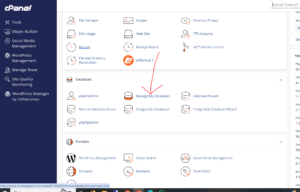
Step 3: Create a New Database User
Scroll down to the MySQL Users section.
In the Username field, enter the username you want to create for your database user.

Examples:
- wordpress_user
- website_admin
- app_user
Choose a username that is easy to identify and relates to the database it will manage.
Step 4: Set a Secure Password
Enter a strong password for the database user.
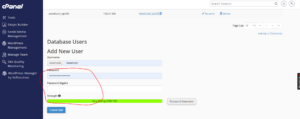
Alternatively, click the Password Generator to automatically create a secure password.
For better security, your password should include:
- Uppercase and lowercase letters
- Numbers
- Special characters
- Sufficient length
Step 5: Create the User
After entering the username and password, click Create User.
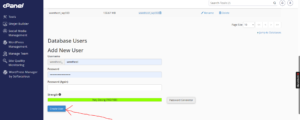
Database User Successfully Created
Once completed, cPanel will display a confirmation message indicating that the database user has been created successfully.
What to Do Next
Creating the user is only the first step. To allow the user to access a database, you will also need to:
- Add the user to a database.
- Assign database privileges.
- Save the permission settings.
Without assigning privileges, the user will not be able to manage or connect to the database.
Best Practices for Database Users
To improve database security:
- Use separate users for different applications.
- Avoid reusing passwords.
- Grant only the permissions required.
- Store credentials securely.
Tip: Save your database username and password in a secure location so you can easily retrieve them during manual website or application installation.