
How to Delete a MySQL Database in cPanel
Deleting a database in cPanel permanently removes the database and all the data stored within it. This action cannot be undone, so it is strongly recommended that you create a backup before proceeding.
Follow the steps below to safely delete a MySQL database in cPanel.
Step 1: Log in to cPanel
Access your hosting account and log in to your cPanel dashboard.
Step 2: Open MySQL Databases
In the Databases section, click on MySQL Databases (or Manage My Databases, depending on your hosting provider’s cPanel theme).
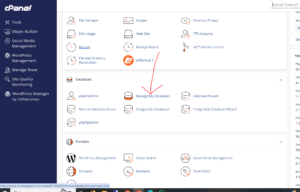
Step 3: Locate the Database
Scroll down to the Current Databases section.
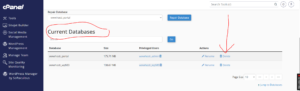
You will see a list of all databases associated with your hosting account. Find the database you want to remove and click Delete next to it.
Step 4: Confirm Database Deletion
A confirmation page will appear asking you to verify the action.
Click Delete Database to permanently remove the database.
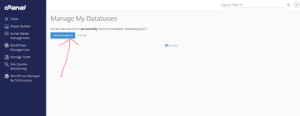
Database Successfully Deleted
Once the process is complete, cPanel will display a confirmation message indicating that the database has been deleted successfully.
Important Warning
Deleting a database will permanently remove:
- All database tables
- Website content stored in the database
- User records and settings
- Application data
- Configuration data stored within the database
This action cannot be reversed unless you have a backup available.
Before You Delete a Database
Consider the following precautions:
- Create a database backup.
- Verify that the database is no longer being used by a website or application.
- Double-check the database name before confirming deletion.
- Ensure you have a recovery plan if the data is needed later.
Common Reasons to Delete a Database
You may want to delete a database if:
- A website has been removed permanently.
- The database is no longer in use.
- You are cleaning up unused hosting resources.
- You are replacing it with a new database.
Tip: Always export or back up your database before deletion. A recent backup can save significant time and effort if you accidentally remove important data.